Adobe Portfolio Alternatives (2026): Where to Move When Creative Cloud Isn't Worth It
The best Adobe Portfolio alternative depends on why you are leaving. If you are cancelling Creative Cloud and only need the site, Pixpa is the cheapest standalone replacement we price here and Cargo is the most distinctive. If you need to sell, Pixpa's zero commission or SmugMug's labs replace something Portfolio never had. If you want the site itself to show your craft, Webflow is the ceiling. Prices below were read between 9 and 10 October 2026.
Stay where you are if you already pay for Creative Cloud for the apps and your site only needs to show work: Portfolio costs nothing extra on a plan you would keep anyway. Leave if the subscription exists mainly to keep the website online, or if you have outgrown a site with no shop, no client galleries and no redirects.
Is it free? Only inside a Creative Cloud plan
Adobe's Portfolio help centre lists it as included with the All Apps, Single App, Photography and Behance Pro plans, and states that there is no stand-alone Portfolio subscription. On Adobe's US photography comparison page on 10 October 2026, the cheapest plan carrying Portfolio was Lightroom (1TB) at US$11.99 a month on an annual plan billed monthly, which is $143.88 a year, or US$119.88 if you pay for the year upfront. Photography (1TB), with Photoshop as well, was US$19.99 a month, or $239.88 a year.
So "is Adobe Portfolio free" has a precise answer: free to people already paying at least $119.88 a year for something else. That is why most people who search for alternatives are really asking a cheaper question — what replaces the site if the subscription goes.
Why people leave, and when you shouldn't
Four reasons come up again and again, and each points somewhere different. The first is cost: the website is the only part of the subscription still in use. The second is selling: Portfolio has no e-commerce at all, so a print, a preset or a session cannot be sold from it. The third is delivery: there are no client galleries, no proofing and no watermarking. The fourth is search: titles, descriptions and alt text are all you control, with no 301 redirects and no schema markup, which our Adobe Portfolio review covers in full.
The reason not to leave is equally specific. Portfolio lets one account run up to five sites, it pulls projects in from Behance, and it costs nothing more on a plan you already use for Lightroom or Photoshop. If none of the four problems above is yours, moving buys you a new invoice and very little else.
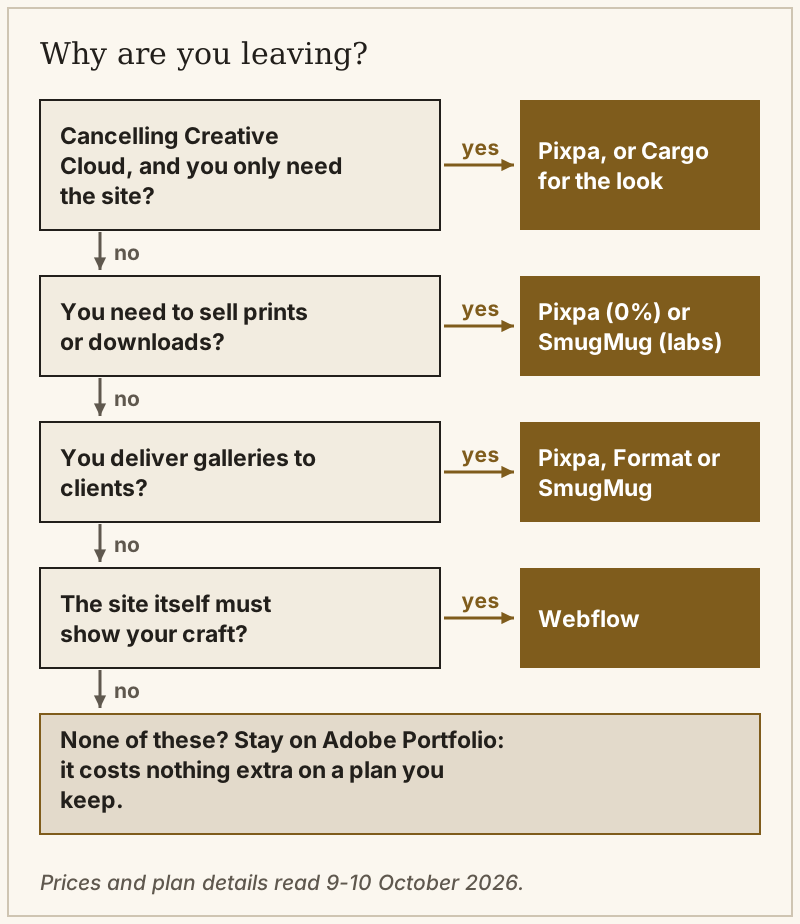
If you are cancelling Creative Cloud
Know what happens first. Adobe's help centre says that when the Creative Cloud plan is cancelled, the site stays live for a 14-day grace period and then goes offline; it remains editable at portfolio.adobe.com and can be republished if you subscribe again. Two weeks is enough to move a small site if you start before you cancel, not after.
For the cheapest like-for-like replacement, Pixpa is the number to beat: its Basic plan was $5.40 a month billed yearly for the first year, $64.80, renewing at 20% off its $9 monthly price, which works out to $86.40 a year. Creator, which lifts Basic's page and gallery-image limits and allows more store products, was $9 a month for the first year. Pixpa lists zero commission on sales on every plan.
If the reason you liked Portfolio was the restraint of its layouts, Cargo is the design-led alternative. It has one price — $14 a month billed yearly, or $19 billed monthly — with one custom domain included and unlimited sites on cargo.site addresses. Selling needs a commerce add-on at $5.50 a month billed yearly, and Cargo charges no per-transaction fee. What it lacks is everything a photographer delivers to clients.
If you need to sell prints or downloads
Portfolio never had a till, so this is the move with the most upside. Pixpa sells on every paid plan with no commission, and its review covers its WHCC fulfilment and its forwarding of orders to other labs. SmugMug sells from its Portfolio plan at $282 a year, routes orders to four professional labs and keeps 15% of your markup, card fees included, as its help centre explains. Zenfolio's Professional plan was $138 for the first year on an offer ending 15 October 2026, with a 7% commerce fee on each order.
Squarespace can sell too, on a different model: its Basic plan was $19 a month billed annually with a 2% store fee, and Core at $29 removes that fee. Prints there run through print-on-demand extensions rather than a professional lab, which suits an illustrator selling posters better than a photographer selling fine-art editions.
If you deliver client galleries
A Portfolio page behind a password is not a client gallery, and this is where Adobe's site falls furthest short. Pixpa includes client galleries and proofing on all plans. Format allocates galleries by tier and pairs them with a Lightroom publishing plugin, which suits photographers who live in Lightroom; its Basic plan was $10 a month billed annually, with its Pro tiers on a first-year offer that must be redeemed by 31 October 2026. Our Format review explains why it does not fulfil prints through a lab. SmugMug is the high-volume option, with unlimited JPEG storage on every plan.
If you want full design control
For a designer whose site is part of the pitch, Webflow is the replacement that raises the ceiling rather than matching it. Its Basic site plan was $15 a month billed yearly without a CMS, and Premium, which adds the CMS for case studies, was $25. The learning curve is real, and code export needs a paid Workspace plan, from $19 a month. Our guide to website builders for graphic designers sets it against the faster options.
The alternatives side by side
| Platform | Entry price, first year | Sell from the site? | Client galleries | Best replacement when |
|---|---|---|---|---|
| Adobe Portfolio | $143.88 paid monthly, $119.88 upfront (Lightroom 1TB) | No | No | You keep Creative Cloud anyway |
| Pixpa | $64.80, then $86.40 | Yes, zero commission | All plans | You cancel Creative Cloud or need to sell |
| Zenfolio | $84 (offer ends 15 Oct) | Professional and up, 7% fee | Yes | You want a cheap first year |
| Format | $120 (Basic) | Pro tiers | By tier | You live in Lightroom |
| Cargo | $168 | With $5.50/mo add-on | No | The look matters most |
| Webflow | $180 (Basic, no CMS) | Separate ecommerce plans | Not built in | The site is part of your craft |
| Squarespace | $228 (Basic) | Yes, 2% fee on Basic | No | You want a broad site with a blog |
| SmugMug | $240 (Direct) | Portfolio plan and up | Yes | You sell volume and need storage |
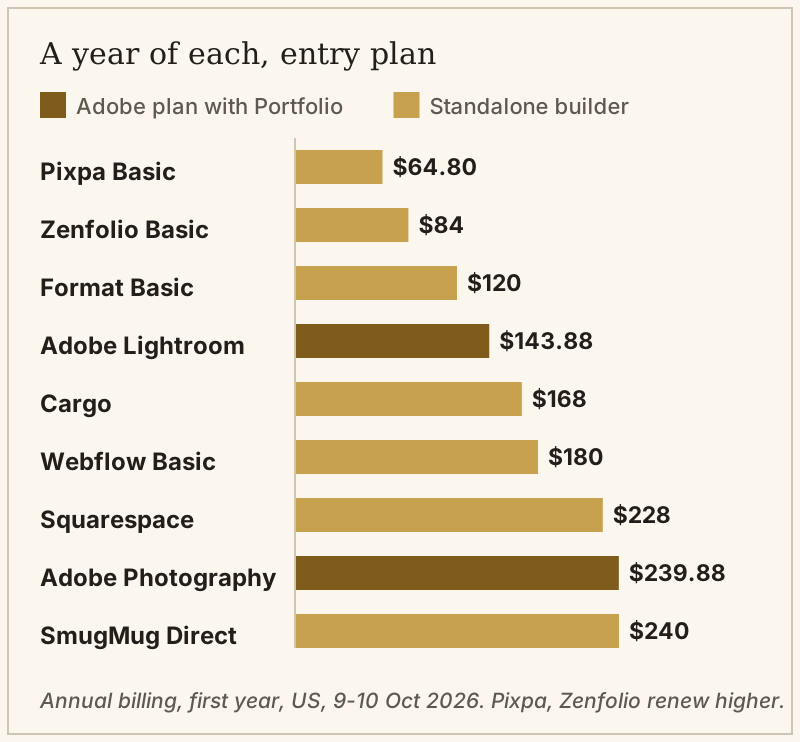
Two readings of the chart matter. Only Pixpa, Zenfolio and Format's Basic plan undercut Adobe's Lightroom plan paid monthly. Against the $119.88 upfront price Format is level, which leaves two cheaper options, both quoted at first-year prices: Pixpa's renews at $86.40 and Zenfolio's at its normal rate. Everything else costs more than staying, so leaving on price alone only makes sense when the Adobe apps are no longer in use. For the full field ranked against each other rather than against Adobe, see our guide to the best portfolio website builders.
Moving your work: what transfers and what doesn't
Your images transfer because you have the originals; the site does not. Portfolio has no redirect tool, so every link anyone shared to a project page stops working the day you switch. The fix is to hold the domain under a registrar account in your own name, rebuild the important pages on the new platform, and use the new platform's redirect settings, where it has them, to point old project addresses at new ones.
Behance is the part you keep. Projects that synced from Portfolio to your Behance profile stay there, and Behance itself is free, so the community side of an Adobe setup survives the move even if the website does not. If you run several Portfolio sites, plan each move separately: Adobe lets one account publish up to five, but each one has to be rebuilt on its own.
Edge cases
If the apps are what you no longer need, check Behance Pro before leaving, because Adobe's help centre lists it among the plans that include Portfolio. If your new platform is still being built, keep Creative Cloud until it is live, because the 14-day grace period starts at cancellation, not at your launch. And if you just want an address on the web for free, Behance is the free alternative, with the limits of not owning the domain or the page.
Catalogue notes
Is Adobe Portfolio free?
What happens to my Adobe Portfolio site if I cancel Creative Cloud?
What is the best free alternative to Adobe Portfolio?
Which Adobe Portfolio alternative lets me sell prints?
Can I keep my domain when I leave Adobe Portfolio?
See where this sits on the wall: the best portfolio website builders, ranked — or browse portfolio examples.